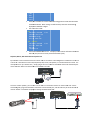
1
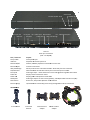
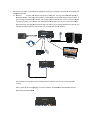
 STATU
US LED Rem
mote On/Off switch POWER LED DC inp
put jack Extt. IR jack DVI‐I video input Reset button
n 7x 10//100 Ethernet ports U
USB to PC DVI/VGA Audio ports VGA paass‐through DT70‐TX
Seven‐port Transmitter CA – PC Adapteer) (PC
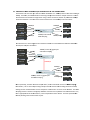
Port / Connector DC input Jaack USB to PC n/Off Remote On
External IR
R port VGA pass‐tthrough DVI/VGA select DVI‐I inputt Status LED D Power LED
Audio portts Reset button port(s) Ethernet p
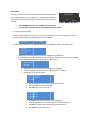
RIES: ACCESSOR
IR Transm
mitter Purpose 5V DC poweer input Keyboard an
nd mouse input to PC Enables / Dissables peripheerals connected
d to receiver unit Connects to IR emitter ocal VGA monittor. Works onlly if source is aalso VGA. Allows you tto connect a lo
Selects betw
ween the VGA o
or the DVI‐D pins on the DVI‐‐I input connecctor Video signal input – utilizees either DVI‐D or the VGA siggnals through tthe select switch Displays network connectiion status wer and operattion mode stattus Displays pow
Audio signal input from so
ource to RX (speaker), and ou
utput audio from RX to PC (m
mic) operation mod
de selection Resets unit, and provides o
on(s) to RX unit(s) through LA
ANs or direct connections 10/100 Etheernet connectio
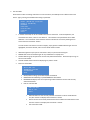
External IR Receiver VGA‐M to DVI‐F adapter DV
VI‐M to VGA‐F adapter Cables