1
®
®
PC-420
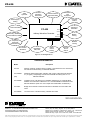
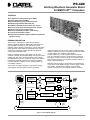
PC-420GEN Standard Waveform Panel. Select a sine, square, triangle, or sawtooth wave; specify frequency amplitude,
offset and phase of the signal. Enter all data at the keypad as though it were a real instrument. Specify the reconstruction
filter for each channel and turn the instrument ON to generate the waveform. Close when done, and the generated signals
remain on the output channels.
PC-420GEN Arbitrary Waveform Panel. Select the clock source, trigger sources and sample scan loop count. Enter the arbitrary
waveform file name, load it into PC-420 waveform RAM. Specify amplitude, offset, and phase of each output waveform. Select
filter and start single or dual channel scanning. Close when done, and the generated signals remain on the output channels.
3