1
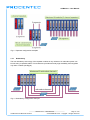
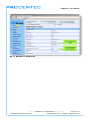
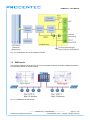
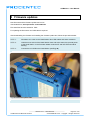
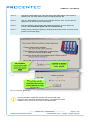
COMbricks – User Manual STEP 4: Start the firmware update tool. If the tool detects the Head Station in the firmware update mode, the "Start update" button is enabled (see Fig. 39). STEP 5: Click on "Start update" to browse to the .PKG file and click "OK". The tool will now upload the new firmware to the Head Station. STEP 6: After the upload the Head Station will update the firmware. This can take a few minutes. The window that appears be can closed directly! STEP 7: Please verify the firmware update by checking the firmware version in the web server (bottom of each web page). Fig. 39 - Firmware update tool It is also possible to update the firmware with just the USB cable. Follow the same procedure as described above. The attached modules will NOT work, but there is full access to the Head Station. _______________________________________________ Version 2.0.0 – 1 October 2011 Page 67 / 100 COMbricks-User-Manual1-EN.docx © PROCENTEC 2011 - Copyright - all rights reserved