1
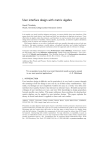
Virtual User Simulator
Applications
Run Time System
(GUIDE Core)
Screenshots
&
AUIs
GUIDE
Profile
Cursor
positions
Simulator
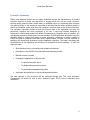
Figure 3-8. Relating Simulator to GUIDE Framework
3.3 Software manual
The simulator is designed as a tool to help designers in visualizing, understanding and
measuring effect of age and impairment on their designs. At present it demonstrates the
simulation of visual and mobility impairment only. It can be downloaded from
http://www.guide-project.eu/index.php?mainItem=Publications&subItem=Project+Deliverables&pageNumber=1&item=22
To run the software, please follow the steps below. The software runs on a Windows XP or
Windows 7 operating system. You may need to manually register one or more library files
depending on your machine configuration. Please use the command
For %a in <Your Drive Name>:\Simulator\Dependencies\*.ocx
do regsvr32 %s
All the library files can be found in the Dependencies folder.
3.3.1
Instructions to run the Mobility Impairment Simulator
3.3.1.1 Basic operations
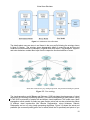
1. Double click on the file MI.exe
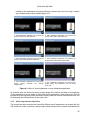
2. The first tab allows you to control severity of three different diseases for three different
devices.
3. Select a disease and change the level of severity using the slider.
4. Select Mouse or Trackball as the input device. The touchpad is not working on this
version.
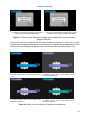
5. Select the second Tab labeled ‘Hand Functions’.
6. In this tab, you can change the level of hand functions of the user.
7. Select the third tab, labeled as ‘Demography’
17