1
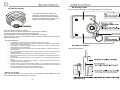
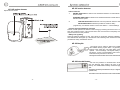
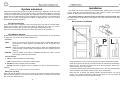
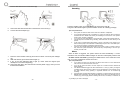
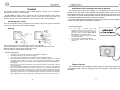
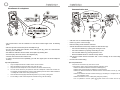
Enrollment of a telephone Communication test Call Azor from an enrolled telephone (A). The communicator must be switched on and all its indicator lights must be flashing green. Call Azor (its SIM card number) from the telephone (A) Press 9 (C) in the voice menu (B). Detector testing mode should be activated. As soon as the GSM LED indicator starts flashing red (B), press the communicator button (C) for a short time. the GSM LED indicator should confirm call reception by flashing blue. Azor then plays the voice menu to the telephone (D). Activate the detectors and the chip reader one after another (D). Test a motion detector by opening and closing its cover. Test a door detector by opening and closing its cover. Test a smoke detector by pressing the button on it. Press the UNSET button to activate the chip reader. Test the menu functions and end the call. In order to access the menu repeatedly, just call Azor again (from the same telephone number). Azor should confirm detector activation with a voice message to the user’s telephone number. End the call to finish testing. Tips and specifications Tips and specifications Only one telephone without a hidden number can be enrolled. The test can commence only when Azor is unset When the telephone is being enrolled, Azor must be unset. If Azor fails to send a report confirming detector activation, check: whether the detector batteries have been installed properly. whether radio communication is shielded by a metal obstacle. whether the distance between the detector and the communicator is too far (try a different location). whether the detector has been enrolled correctly (by connecting to a computer and checking the registration code). whether the antenna is not in a bad place (change its position) it is not possible to set the system during test mode and no alarm can be triggered - 13 - Only the first user’s telephone can be enrolled in the above-mentioned way. You can use the same way to replace the first user’s telephone number with another one. The originally enrolled telephone number is then deleted (Azor will send an SMS notification – including the number of the newly set telephone). Azor should set the language automatically based on your country calling code. For the setting of other users’ telephones and their locking, see the Settings. - 12 -