1
Table of Contents
1: Report Writer Basics ............................................................................ 1
OpenMFG Report Writer ................................................................................1
OpenRPT.........................................................................................................3
The Toolbar.....................................................................................................4
New File .......................................................................................................................................................5
Open File .....................................................................................................................................................5
Save File ......................................................................................................................................................6
Cut................................................................................................................................................................6
Copy .............................................................................................................................................................6
Paste.............................................................................................................................................................6
Show Grid ....................................................................................................................................................7
Snap to Grid.................................................................................................................................................9
Labels...........................................................................................................................................................9
Fields .........................................................................................................................................................12
Text Areas...................................................................................................................................................16
Lines...........................................................................................................................................................19
Bar Codes ..................................................................................................................................................21
Images........................................................................................................................................................24
Graph Editor..............................................................................................................................................27
Managing Report Definitions .......................................................................36
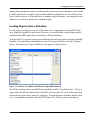
Loading Reports from a Database .............................................................................................................37
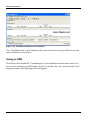
Saving to XML ...........................................................................................................................................38
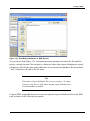
Loading from XML.....................................................................................................................................40
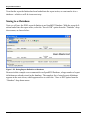
Saving to a Database .................................................................................................................................42
Report Writer User Guide iii