1
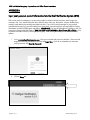
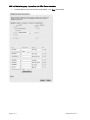
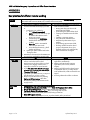
Shell and Motiva Emergency Preparedness and Office Closure Procedures Shell and Motiva Emergency Preparedness and Office Closure Procedures Shell and Motiva Check-in Number General check-in phone numbers have been established and check-in is mandatory the day after any emergency, including natural disasters, for employees who reside or work within the impacted area(s). In this event, we ask each employee to call one of the check-in numbers within 24 hours of the event or at the soonest time possible. This will greatly enhance our ability to confirm the support requirements of our staff. The general check-in phone numbers are: (866) 745-5489 or (877) 40-SHELL You can also check-in online at http://www.shell.us/help Additionally, staff should check-in with their direct supervisor. Informed Decision Making and Hurricane Preparedness Because of the potential impact to our employees, assets and offices, Shell and Motiva maintain a vigilant watch of threatening tropical weather through the dedicated Hurricane Incident Command Team and our contracted Weather Service. When a tropical weather system has the potential to impact an office location, instructions will be communicated for the potential closure of the affected office(s). On-site Senior Management makes the decision to close an office complex with consultation from the Hurricane Incident Command Team, Shell Real Estate Services, State, City and Local officials. Every effort will be made to consider time needed for employees to complete office storm preparations and return home to prepare for potential evacuation from the area. IMPORTANT: Each employee must give careful consideration for his or her own personal situation with regard to evacuation requirements. Personal needs and considerations should be discussed in advance with your direct supervisor. Contractors should follow the emergency procedures of their employing company. Employee Responsibilities & Actions 1. Ensure that your emergency contact information is up-to-date in HR Online Self-Service (http://sww-people.shell.com/selfservice.htm -- See Appendix A in this document for instructions.) Supervisors are expected to print a hard copy of their staff members’ information and should have it with them at all times. 2. Ensure your personal contact information is updated in HR Online Self-Service Update your home phone number on the Permanent Residence information screen and store two additional phone numbers in the MOBL and TEL2 fields at the bottom of the screen. (See Appendix A for more information). When you call the Emergency Preparedness Phone System to check-in after a hurricane, the automated system will ask for your phone number. When you use any one of these 3 numbers (primary phone, MOBL or TEL2), the system will be able to match you to your Shell People record. 3. Ensure your contact information is updated for the Shell Notification System (SNS) in order to receive facility updates SNS can be used in an emergency to contact many people in a matter of minutes via phone, email, pager, text message or fax. Your contact information that is stored in Who’s Who (e.g. desk phone, company mobile phone, company email address) has already been loaded into SNS. However, in the event of an emergency, you may not be in the office. You should update the SNS information to include your home, emergency, and cell phone numbers so that these alternate numbers are available. See Appendix B for instructions. PLEASE NOTE: You are still responsible for checking-in with your supervisor and the general Shell check-in ((866) 745-5489 or (877) 40-SHELL or http://www.shell.us/help) as soon as possible, and within 24 hours, following any emergency. SNS will only be used to provide additional facility updates. Page 2 of 11 Updated May 2012