1
simulation results, calculate volumes, produce maps and design development strategies to
maximize reservoir exploitation. Schlumberger aims to build this software into a single
application portal which will reduce the need of multitude of highly specialized tools, and can
control the life-cycle of the petroleum data.
Installation and basic setup
The installation of the Emotiv software was pretty straightforward and we did not encounter
any problems at all. We installed it only on Windows. After reading the user manual we
started by moistening the sensor knobs and charging the batteries which is also easy and
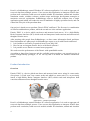
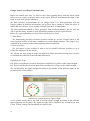
straightforward. Picture 2 has all the items in the EPOC Headset Kit.
PICTURE 2 - Overview of equipment
From the top left: Neuroheadset, USB Transceiver, CD Installation disk (Windows only),
Hydration Sensor Pack with 16 sensor Units, Saline solution and Battery Charger.
The USB transceiver will connect the headset with the computer. The Hydration Sensor pack
is where the sensors will be stores when they are not connected to the headset. The saline
solution is used to moistening the felt in front of each sensor and it also disinfect.
As to Petrel, it is professional software for petroleum industry. The setup and use of the
software will take quite long time due to the special requirements for this professional
software. People from SLB help us to go install the software on SLB workstation, and guide
us through some basic functions for this software. Due to the special requirements for this
software, we cannot install Petrel on our own laptop and try it at home or in the university. It
means that we will have limited time on learning or use this software, so we will limit our
research target to some basic functions under this situation.
Emotiv Control Panel
The Emotiv Control Panel is one of the user-interfaces and the one that controls and connects
with both EmoComposer and EmoEngine. (We`ll come back to this).
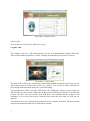
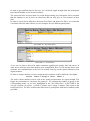
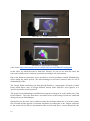
The first one will see is the Headset setup (picture 4). This will provide the user with a
headset setup guide which basically just is guidance regarding how to fit the neuroheadset on
the head. As you can see on the picture below are all the sensors green which indicates very
good signal.
5