1
Printing from a digital camera ........................................ 15
Customizing your photo prints ....................................... 16
Printing an index page ................................................................ 16
Printing all photos ....................................................................... 16
Printing a photo in black and white ............................................. 17
Cropping a photo ........................................................................ 18
Adjusting the brightness .............................................................. 19
Adjusting the number of prints .................................................... 20
Viewing slide show ...................................................................... 21
Printing DPOF selection .............................................................. 21
Customizing your printer settings ................................. 22
Changing the blank paper size ................................................... 22
Changing the blank paper type ................................................... 22
Changing the print quality ........................................................... 23
Adjusting preview before print ..................................................... 23
Changing the control panel display language ............................. 23
Changing the power save ........................................................... 24
Clearing photo settings ............................................................... 24
Restoring factory defaults ........................................................... 25
Traveling with your printer .............................................. 26
Before you travel ......................................................................... 26
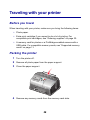
Packing the printer ...................................................................... 26
Unpacking the printer .................................................................. 28
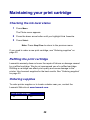
Maintaining your print cartridge ..................................... 30
Checking the ink level status ...................................................... 30
4