1
File-based Decoding User Manual
Chapter 11: Primitives
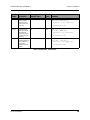
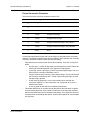
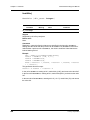
Format Conversion Characters
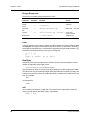
These are the format conversion characters used in CSL:
Code
Type
Output
c
Integer
Character
d
Integer
Signed decimal integer.
i
Integer
Signed decimal integer
o
Integer
Unsigned octal integer
u
Integer
Unsigned decimal integer
x
Integer
Unsigned hexadecimal integer, using "abcdef."
X
Integer
Unsigned hexadecimal integer, using "ABCDEF."
s
String
String
A conversion specification begins with a percent sign (%) and ends with a conversion
character. The following optional items can be included, in order, between the % and the
conversion character to further control argument formatting:
•
•
LeCroy Corporation
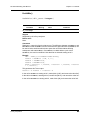
Flag characters are used to further specify the formatting. There are five flag characters:
•
A minus sign (-) causes an argument to be left-aligned in its field. Without the
minus sign, the default position of the argument is right-aligned.
•
A plus sign inserts a plus sign (+) before a positive signed integer. This only
works with the conversion characters d and i.
•
A space inserts a space before a positive signed integer. This only works with
the conversion characters d and i. If both a space and a plus sign are used,
the space flag is ignored.
•
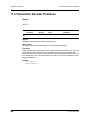
A hash mark (#) prepends a 0 to an octal number when used with the
conversion character o. If # is used with x or X, it prepends 0x or 0X to a
hexadecimal number.
•
A zero (0) pads the field with zeros instead of with spaces.
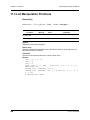
Field width specification is a positive integer that defines the field width, in spaces,
of the converted argument. If the number of characters in the argument is smaller
than the field width, then the field is padded with spaces. If the argument has more
characters than the field width has spaces, then the field expands to accommodate
the argument.
37