1
Making the Device Settings
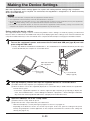
Make the device settings and save the "setting.ini" settings file, overwriting the previous file.
(1) Make the settings.
Settings:
For the paper size and aspect ratio, click the radio button
for the desired item to select it.
Time Day Stamp:
For the time day stamp, use the computer's number keys to
input the current date and time.
(2) If you have changed the copyboard's device settings, click
the "Set" button for the "Settings" section.
If you have changed the date/time setting, click the "Set"
button for the "Time Day Stamp" section.
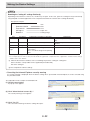
(3) The save file screen appears when one of the "Set" buttons
is pressed. Save the "setting.ini" file (overwriting the previous file) in the following location:
Save to location: "setup" folder for the copyboard (removable disk)
File name: setting.ini
(4) Close the web browser.
This completes the device settings.
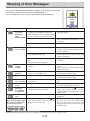
Item Name
Paper Size
Printing Image
Time Day Stamp
Description
Default Setting
Sets whether to print on the printer in A4 or letter size.
North America: Letter
A4 size printing range: Equal ratio – 145 x 287, Compressed – 195 x
Others: A4
287
Letter size printing range: Equal ratio – 136 x 269, Compressed – 206
x 269
This is only selectable on wide type copyboards.
Match Paper Size
This selects the vertical:horizontal aspect ratio of the image when
printing.
Original Image: Image is printed with the same aspect ratio as on the
copyboard's sheet surface.
Match Paper Size: Image is compressed horizontally to the A4 or letter size paper's aspect ratio (ex.: circles become
ovals).
Input the current date and time.
The entry fields are as follows (in order): Year / Month / Day / Hours:
Minutes
Input as follows:
Year: 4 digits, Month: 2 digits (ex.: 03 for March),
Day: 2 digits (ex.: 06 for the sixth),
Hours: 2 digits in 24-hour format (ex.: 14 for 2:00 pm, 06 for 6:00 am),
Minutes: 2 digits (ex.: 00 for 0 minutes)
* Do not input spaces. If this is done, the file will be recognized as corrupt when the copyboard is started and the settings well be reset to
the defaults.
Get Current Time :
When “Get Current Time” button is clicked, the display switches
to the computer’s current time. This eliminates the need to set the
current time on the copyboard.
E-21