1
6. BANK IDENTIFICATION TABLE (BIN) TABLE
To down load the latest BIN table go to the following URL
https://www.trustmarque.ca/Paymenttrust1.2-Live/BINSDownload/
And type in the username and password (If asked), below;
Username: support
Password:tmicsupport
Right click on tmibin.csv
A pop up window appears click on save
Change the file extension from csv to txt and then click save to your desired location.
It will take approximately 4 minutes to download and will be a 7 MB file. The BIN table
may be downloaded as often as required. PaymentTrust will update the table weekly on a
Wednesday, at 8.00am GMT. PaymentTrust will erase all BINs on this day and upload the
new table from NatWest. Therefore there is no update just a complete replace.
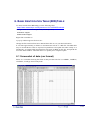
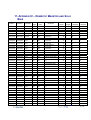
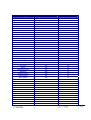
6.1 Screenshot of data (csv format)
Below is a screenshot showing the fields of data provided. The list is CardBIN1, CardBin2,
CardName, CardType and CountryCode.
6-25