1
Version 1.0
Revision Date: April .1, 2015
Chapter 3: Getting Started
User’s Manual
User’s Manual
This chapter provides more detailed information and let you know how to install components into the
PER535A embedded System.
Prior to removing the chassis cover, make sure the unit’s power is off and disconnected from the
power sources to prevent electric shock or system damage.
3.1 Installing a 2.5" SATA HDD/SSD
PER535A supports 2 x 2.5" SATA HDD/SSD
1.
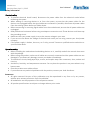
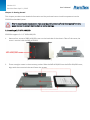
Remove four screws of SATA HDD/SSD cover on the back side of the chassis. Take off the cover, the
cover is used to hold the SATA HDD/SSD.
2.
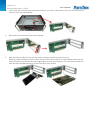
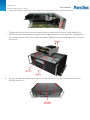
There are eight screws in the accessory packet. Slide the SATA HDD/SSD into the SATA HDD/SSD cover,
align with the mounting holes and fasten the screws.