1
HTTP://WWW.SUNCTI.CO.TH
USER MANUAL
3. Installation
Please make sure you have the following items in the product package you received,
1. S02 phone
2. 5V power supply
In addition, you need,
1. A Cat-5 Ethernet cable
2. An Ethernet port connecting to IP networks
Please follow the instruction below for IP phone setup:
1. Insert one end of Cat-5 Ethernet cable to “LAN” port on the back of IP phone and the
other end to Ethernet port connecting to IP networks.
2. Insert 5V power supply cable into the power plug of IP phone.
3. Check and confirm all connections are correct.
Now you can power on the 5V power supply.
4. Setup Guide
It is possible that this product has been pre-setup by either a service provider or network
manager. Then user’s own configurable settings can be very limited. However, if end
user is allowed to make changes to the system and service settings, the following are the
instructions for your device setup.
End user needs to get the following information from his/her service provider or network
manager,
• IP address if it is static, subnet and network gateway IP address, or user DHCP.
• SIP proxy server IP address and any registration information.
• User information such as user ID and password.
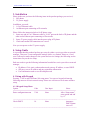
4.1 Setup with Keypad
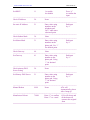
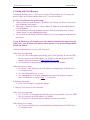
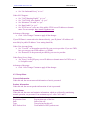
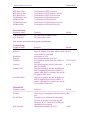
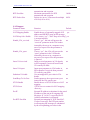
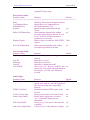
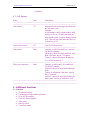
Pressing “**00”to enter IP-Phone 100 setup menu. You can use keypad referencing
following menu to do basic network setup. Please use web browser to do more advance
setup.
4.1.1 Keypad Setup Menu
Option
Code
User Input
Notes
===============================================================
Enter configuration menu
**00
None
After “Setup menu”,
enter option and end
by “#”
-----------------------------------------------------------------------------------------------------------Check DHCP
10
None
Announce
DHCP Status
on or off
------------------------------------------------------------------------------------------------------------