1
Pressure Gauge
Logging Pressure
Export Options
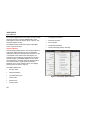
Use the Export Options screen to change the default
selections for the file type and run description fields to be
exported from the Log Upload Display. When data is first
uploaded, the selections are set to these default values.
After the first data display, the selections can be
temporarily changed for each export, and stay changed
for the length of the data display. Logged pressure is
always exported. See Figure 4.
gto003.jpg
Figure 4. The Export Options Screen
11