1
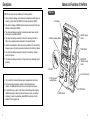
Names and Functions of the Parts
Names and Functions of the Parts
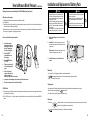
Explanation of Functions
Ready to Measure
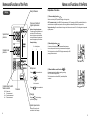
Display
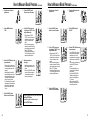
(1) Pressure setting function
P-SET
Inflation can be set by AUTO (automatic setting) or the target value.
AUTO (automatic setting): In the SINGLE (single measurement), AVG. (average), and MANU. (auscultation) Modes, the
monitor estimates the systolic blood pressure value during inflation and automatically inflates to the proper value.
Pulse level / Number of
irregular pulse waves
Number of irregular pulse waves:
The pulse wave having a difference of
more than ±25% from the average
interval of pulse waves is determined
as irregular. Number of irregular pulse
waves are displayed up to three times.
SYS
Systolic blood
pressure
mmHg
Example of display
DIA
1
Diastolic blood
pressure
No. of arrhythmias
2
Target value setting: The monitor inflates to the target value. Pressure value is set to 30 to 40 mmHg above the expected
systolic pressure.
(2) Non-display function
3
HIDE
A function not to display the results of measured blood pressures.
However, the pressure values during the measurement are displayed.
ON/OFF
START
This function can be used when SINGLE (single measurement) or AVG.
(average) Mode is selected.
HIDE
DEF
N
AVG L AT I O r d
. /1st / 2nd / 3
P-SET
140
mmHg
MODE
SINGLE
180
MANU.
CHECK
AVG.
220
100
STOP
260
280
AUTO
PULSE
BPM
AC
Battery level
Displays
HIDE
(3) Manual deflation control function
for the usable level.
A function to accelerate the deflation speed by pushing a
DEFLATION Button during deflation.
ON/OFF
This function can be used when MANU. (auscultation) Mode
is selected.
Displays
START
HIDE
DEF
N
AVG L AT I O r d
. /1st / 2nd / 3
P-SET
140
100
for the low level.
Contents when the AVG.
Mode is selected
AVG.
1st
2nd
3rd
: Mean value
: First measurement
: Second measurement
: Third measurement
Pulse rate
Displays
MODE
SINGLE
180
AVG.
220
MANU.
CHECK
STOP
260
AUTO
280
for the unusable level.
Charging
Displays
when the battery
pack is being charged.
External power source
Displays AC when the unit is
connected to the AC adapter.
4
5