1
Package Contents
Troubleshooting
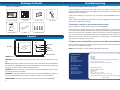
What is included
No sound or hard to hear the visitor:
If you are finding it hard to hear the visitor, adjust the volume on the side of the
monitor to make it louder. If this is not sufficient, ask the visitor to stand closer to the
doorbell unit when speaking.
If the visitor is finding it hard to hear you, stand closer to the MONITOR unit when
speaking.
3.5" TFT -LCD monitor
Outdoor camera
& bracket
Monitor bracket
Power adapter
If you are still having difficulties, check that everything is properly installed as per the
Installation and Wiring instructions.
The image is unclear or you cannot see the visitor:
User's
Manual
User's manual
Make sure there is nothing covering the lens on the DOORBELL.
Cable
If you are finding it hard to see your visitor, adjust the brightness or ask the visitor to
stand closer to the doorbell. The doorbell is quite good at displaying people standing
within a few meters of the doorbell in darkness but if you are still having problems,
you may need to install an additional light near the doorbell to illuminate the area.
Screws and others
Layout
Make sure the wiring is attached as per the color coding shown on the back of the
unit and in the diagrams in this manual.
The door is not unlocked when you press the door unlock button:
Screen
Monitor
Talk
Unlock
Warning
Microphone
SCREEN: This is where you view your visitor that the camera sees.
MONITOR: Press this button to connect to the camera and view what the camera
sees.
TALK: Press the TALK button to speak to your visitor. You do not need to hold down
the button. The MONITOR connects to the doorbell for 1 minute. If you need to talk
for longer, you will need to re-press the TALK button.
UNLOCK: If you have attached an electric door strike to the CAMERA, you can unlock
the door by pressing this button.
WARNING: If you get unwanted visitors, you can press this BUTTON to trigger an
alarm at the doorbell that will maybe scare off the visitor or attract attention.
MICROPHONE: The visitor speaks into this to communicate with the MONITOR.
2
Make sure the wiring to the door strike (door latch mechanism) is wired correctly and
that the wires are properly attached.
NOTE: You will require a 12V DC powered doorlock mechanism.
INDOOR MONITOR
Operating Power:
Resolution:
Display size:
Cut-off time:
Operating temperature:
External Dimensions:
DC 13.5V
320x240
3.5” LCD
1 minute (before unit enters standby from call/monitor)
-20°c ~ +50°c / -4°F ~ 122°F
167mm x 98mm x 25mm / 1.0” x 6.6” x 3.9”
OUTDOOR CAMERA
Power supply:
Viewing angle:
Lighting source:
Night vision distance:
Operating temperature:
External dimension:
(supplied by monitor)
52° for the pinhole camera
Infrared LED
9ft / 3m
-20°c ~ +50°c / -4°F ~ 122°F
100mm x 100mm x 22mm / 3.9” x 3.9” x 0.9”
Due to product improvements, specifications may change
without notice.
7