1
Hilfe
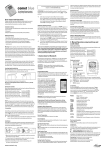
Setting Individual Program
Problem
PROG
MENU
OK
Day/
Block
DAY1
D1-5 Mo-Fr
D1-6 Mo-Sa
D1-7 Mo-Su
Monday
Set the beginning
OK
of the 1. Heating Time
OK
Set the beginning
of the 1. Economy Time
Radiator is
not getting
warm.
Boiler water temperature O.K.?
Correct water temperature of the
boiler
Take off Radiator Thermostat HT 100
BT Move by hand the valve tappets
back and forth several times.
Radiator is
not cooling
down.
Valve does not close completely.
Possibly the closing point of your
your valve seat has moved.
EAdapt again (see “Adaptation”)
Repeatedly move valve tappets by
hand - perhaps an adaptation is not
possible because your valve may be
calcified, or the seal does no longer
fulfill its function.
Thrust piece
falls out.
(This may also
cause an E1
error!)
Due to an endless thread
the thrust piece mounted on
the bottom may fall out when
the controller was not applied
on the valve.
Insert thrust piece. Adapt the
device via the MEN point, or by
removing and re-inserting the
batteries. Now, the endless threat
rotates and tightens the thrust
piece firmly. Attach to the radiator
and adapt again.
E1-E3
By pressing any button the fault indicator
disappears from the display and the adaptation restarts!
E1
No adaptation possible.
Valve does not open, after
Summer heating pausecalcified?
keylock
LED
The LED lights up in each case
during the heating-phase until
the set temperature is reached.
OK
+
Hold both buttons
for several seconds.
Activate key lock.
To deactivate, hold the
two buttons pressed
for several seconds.
Radiator Thermostat HT100 BT not
mounted on radiators.
Setting Holidays
MENU
URLA
OK
First set the date of the re-start of the
regular heating time. (Set the end of the
holiday)
OK
The process can be terminated prematurely
by pressing the MENU button.
OK
OFFS
s the device correctly mounted on
the radiator?
Mount Radiator Thermostat HT 100
BT.
E2
Valve lift too short or
Battery power too weak.
Open and close valve tappets by
hand several times or install new
batteries.
E3
No valve movement possible.
Do valve tappets move freely?
Declaration of Conformity
Hereby, Conrad Electronic SE, Klaus-Conrad-Straße 1, D-92240 Hirschau
declares, that this product is in compliance with the essential requirements
and other relevant provisions of Directive 1999/5/EC. The Declaration of
Conformity for this product can be found at www.conrad.com
Setting Offset
MENU
Solution
Change batteries
OK
You can optionally enter additional heating and economy periods. If you do not want to
make any further settings, confirm the display „–– ––“with OK.
Select temperature
Cause
Batteries are low
Advice on environmental protection:
OK
Room temperature adjustment. Here you
have the possibility to set a temperature
of (-5 / + 5 °). The temperature determined
by the instrument may differ from the
perceived temperature by the user.
In this case, the temperature determined
by the instrument must be adjusted.
OK
From the date of implementation of European guidelines 2002/96/EC and
2006/66/EC, into national law, the following applies: Electric and electronic
devices and batteries may not be disposed of in household waste. The consumer
is obliged to return electric and electronic devices and batteries to the public
collection points established for them or to the point of sale. The particulars
of this are regulated by the applicable state laws. The symbol on the product, operation
instructions or packaging points to these provisions. You make an important contribution
to the protection of the environment by reusing or recycling old equipment/batteries or
making use of them in other ways.
Timer function
Guarantee
Here any temperature for a selected time period can be set. Press button, set the time
for which the timer program is to be overridden. Confirm with OK. Set the desired temperature.
Confirm with OK. A manual temperature change is then in the given period not possible,
the setting wheel is locked. By pressing the Menu button, the lock-up can be released.
Dismantling
1.
For damages caused by failure to observe this Instruction Manual, the warranty/guarantee
is voided! For consequential damages we assume no liability! For material or personal damage caused by improper handling or failure to observe the safety information, we assume
no liability! In such cases, the warranty/guarantee is voided!
Maintenance and Cleaning
2.
Maintenance or repair may only be performed by a specialist or specialist workshop. There are
no serviceable components for you inside the product, therefore, never open/disassemble it
(except for the battery change as described in this manual). Never use aggressive cleaning
agents, rubbing alcohol or other chemical solutions as they may cause damage to the
housing or even impair its operational functions.
Technical Specifications
In order to disassemble the Radiator Thermostat HT100 BT set to position ON, for this turn
the setting wheel beyond the highest temperature of 28 C° until ON appears in the display.
Wait briefly before loosening the screw connection. Then pull off the Radiator Thermostat
HT100 BT from the valve.
Operation via App
The app can be found in the App Store/Google
Play Store for free under: Sygonix HT100BT
Follow the menu structure of the app. Initial
start-up: PIN 000 000
Power supply:
Factory settings:
Switching points:
Frost protection function:
Calcification protection:
Window function:
Modes:
Dimensions:
2 AA batteries / Mignon
Comfort temperature: 21 ° C
Economy temperature: 16 ° C
1. Heating time: Start 7:00 o’clock
1. Economy Time: Start 22:00 o’clock
4 heating times, 4 economy times
Yes, activation at temperature below +6 ° C
Yes, valve movement 1x per week
Yes
Automatic / Manual
80 x 70 x 52 mm (W x H x D)
sygonix®
distributed by
Conrad Electronic SE
Klaus-Conrad-Str. 1
D-92240 Hirschau
www.sygonix.com