1
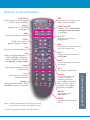
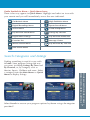
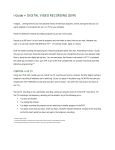
Remote Control Features
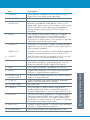
VOD/OND
Direct access to On Demand
(OND), where available
Replay
Replays last 15 seconds
of program
Help
Learn more about a feature
PAGE
Scroll to the next or
previous page of listings
Exit
Return to watching television
OK
Select a highlighted item; or
while watching a program,
press to display or remove
the Flip Bar or Mini Guide
Guide
See program listings for the
current time
Numbers
Press channel numbers, then
OK/SEL to tune to a channel
Direct Access to Pay-Per-View
(PPV), where available
VCR Controls
Controls VCR, ON DEMAND
and Digital Video Recording
(if available)
Live TV
Displays live television
programming
FAV
Tune to your Favorite channels,
once you set them up
CH +/Change channels and access
the Flip Bar
LAST
Return to the previous screen
or channel
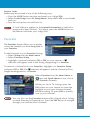
Info
See program information
Arrows
Use to highlight guide
features; or, while
watching television,
press to begin browsing.
Note: Arrows control
playback of recorded
programs with DVR.
MENU
Enter and exit the
Main Menu
SWAP
Note: Remote pictured may not reflect your actual
remote. Basic functions should be the same.
*Amount of programming data varies by system.
Swap between television
tuners
REMOTE CONTROL FEATURES
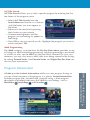
Day*
See listings for the next
or previous day
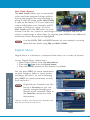
PPV
4