1
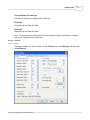
Customizing Font Creator
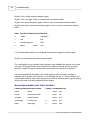
Ctrl-I
Open Installed Fonts
Ctrl-N
New Font
Ctrl-O
Open Font
Ctrl-P
Print
Ctrl-R
Repeat
Ctrl-S
Save
Ctrl-T
Invert Selection
Ctrl-U
Clear Selection
Ctrl-V
Paste
Ctrl-X
Cut
Ctrl-Y
Redo
Ctrl-Z
Undo
137
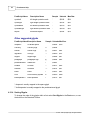
Keys for working in the Glyph Overview window
Press
To
Alt+Enter
To glyph's properties
Enter
Open Glyph Edit window
Backspace
Clear selected glyphs
P
The first 256 characters mapped to the selected glyphs will
be placed into the preview toolbar
Plus Sign
Increase the cell size
Minus Sign
Decrease the cell size
Keys for working in the Glyph Edit window
Press
To
Plus Sign or Ctrl+Plus Sign
Increase the zoom factor
Minus Sign or Ctrl+Minus Sign Decrease the zoom factor
Alt+Left Arrow
To previous glyph
Alt+Right Arrow
To next glyph
© 1997 - 2007 by High-Logic, all rights reserved.