1
Hardware Configuration
21
The 4 Speakers System
Onboard Sound Pro provides 2 wave channels (front/rear),
known as the 4 speakers system. When application
programs via DirectSound® 3D or A3D® interface locate
the sound sources to the listener's back, the two rear
speakers will work to enhance the rear audio positional
effect, so as to complement the insufficiency of using only
two front speakers to emulate the audio effect. The
following is the hardware installation and the software
setups:
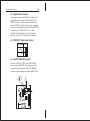
1. The speaker installation.
Connect the front pair speakers to the Line-out jack on the
Sound port, and then connect rear pair speakers to Line-in/
Rear jack. The original Line-in can be moved to Aux-in.
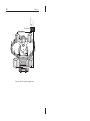
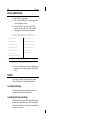
2. The positions of the speakers
Put your speakers the way the following picture suggests,
so as to avail yourself to the best audio result.
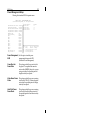
3. The mixer setup
When user was setup the PCI Audio Application, there is a
4 speakers option in the Volume Control of the Mixer, click
4 SPK icon to enable this option, it means the rear speakers
are connected to Line-in/Rear jack. When Line-in/Rear jack
is connected to other external Line-in sources, please DO
NOT enable this option in order to avoid hardware conflicts.
Regarding rear speaker option, you can turn on/off the
output of the back speakers, and adjust the volume of
speakers to the same volume.
4. The demo
Execute the "Helicopter" demo within the C3D HRTF
Positional Audio Demos of the PCI Audio Application.
When the helicopter flies behind you, the rear speakers will
work.