1
Section 10-3
Handling
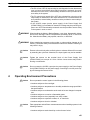
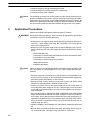
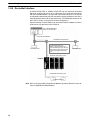
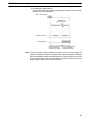
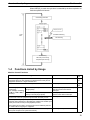
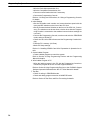
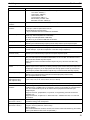
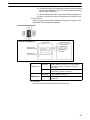
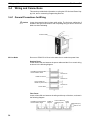
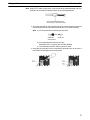
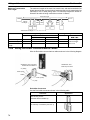
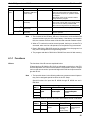
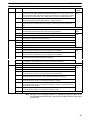
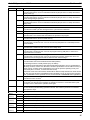
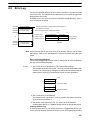
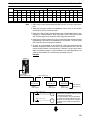
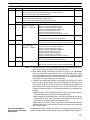
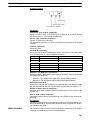
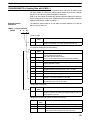
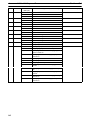
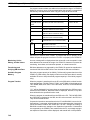
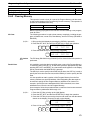
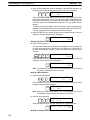
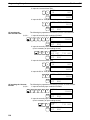
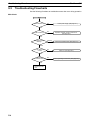
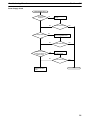
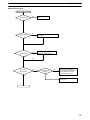
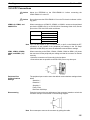
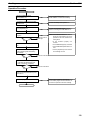
Operation Procedure
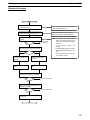
Start
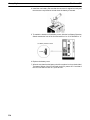
Mount the EEPROM to the
CPM1-EMU01-V1.
Mount the EEPROM to the CPM1-EMU01-V1
before connecting to the PC.
Connect the CPM1-EMU01-V1 to the PC’s
communications port (peripheral port).
After 2 or 3 s, check if the indicator is
lit green.
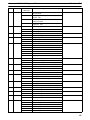
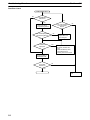
No
Check the orientation of the connector
before connecting the CPM1-EMU01-V1.
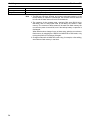
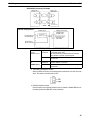
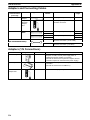
Note If the indicator is not lit at all, lit red or
See the note
on the right.
blinks red, uploading will not be possible. In this case, check the following items.
• Is the connector properly connected?
Yes
• Is the EEPROM properly mounted?
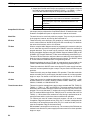
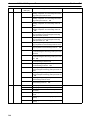
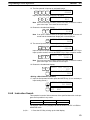
Select the memory area to be uploaded.
• Are the EEPROM specifications correct?
• Are the peripheral port communications settings correct?
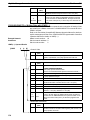
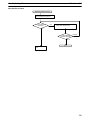
Upload both the ladder
program and DM 6144 to
DM 6655.
Upload only the ladder
program.
Press the UPLOAD+DM
Button.
Press the UPLOAD Button.
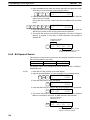
Check if the indicator is blinking green
(indicating that uploading has started).
See the note above.
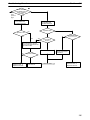
No
Yes
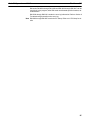
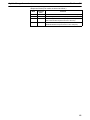
Check if the indicator is lit green (indicating that uploading has been successfully completed).
No
See the note above.
Yes
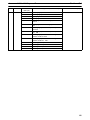
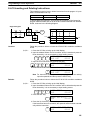
Remove the Expansion Memory Unit
from the PC.
End
227