1
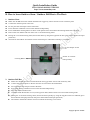
Quick Installation Guide LCD GSM ALARM SYSTEM LH http://www.usmartbuy.com C. How to Code/Learn Sensors to The Host: It is recommended to turn off all sensors first and then only turn on the sensor which needs to be learned. After each successful learning, please turn off the learned sensor and then turn on the next sensor which needs to be learned. 1. Remote control (key fob) coding Press 6666# on the host keypad “SET” LED on the host is blinking Enter 21# LCD displays series number (1 to 05, totally can add 5 remote controls) Trigger remote control by pressing a key Voice “coding completed” to indicate the successful operation LCD shows the next group number Trigger another remote control to code. Press *# to exit the setting status 2. PIR coding: Please note, PIR warms up for 60 seconds after the switch at the side is turned on. During the warming-up period, the LED on the PIR will be blinking, but it will not be triggered by motion or send any signal to host. Turn on the switch at side of the PIR Wait 60 seconds for warming up Press 6666# on the host keypad “SET” LED on the host is blinking ¹Enter 23 Enter zone number (can be 02 to 99) press # The corresponding zone number shows on the LCD Trigger the PIR Voice “coding completed” to indicate successful operation. After that please turn off coded sensor and start from ¹ to code another sensor or press *# to exit the setting status 3. Door/Window gap sensor coding: Open the door sensor case and install the battery Press 6666# on the host keypad “SET” LED on the host is blinking ¹Enter 23 Enter zone number (can be 02 to 99) Press # The corresponding zone number shows on the LCD Trigger the door sensor by pressing the button on the front Voice “coding completed” to indicate successful operation. After that please turn off coded sensor and start from ① again to code anther sensor. After that please turn off coded sensor and start from ¹ to code another sensor or press *# to exit the setting status 4. Smoke detector coding: Install the battery Press 6666# on the host keypad “SET” LED on the host is blinking ¹Enter 23 Enter zone number (can be 02 to 99) Press # The corresponding zone number shows on the LCD Trigger the smoke sensor by pressing and hold the test button Voice “coding completed” to indicate successful operation After that please turn off coded sensor and start from ¹ to code another sensor or press *# to exit the setting status Copyright @ 2013 shield4u