1
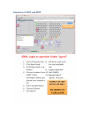
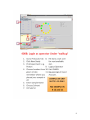
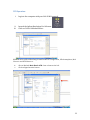
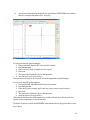
a Click the Instrument State tab. b For the Instrument Mode, click Extended Dynamic Range. c Click Apply. d Click the Autotune tab. e Clear the Fast Polarity Switching check box. f Click Quad Tune. If Quad Tune produces unacceptable results you can do an Initial Quad Tune (50 to 60 minutes). If this also fails to give acceptable results, please contact Terence. If you would like to use custom tune parameter values, you can also do a Manual Tune. 13 Set the Mass Range and the Instrument Mode that you want to use to acquire data. a Click the Instrument State tab. b Select the appropriate Mass Range. c Click the appropriate Instrument Mode. d Click Apply. 14 If you want to use Fast Polarity Switching, enable Fast Polarity Switching on the Instrument State tab and recalibrate If you have a Q-‐TOF instrument, Fast Polarity Switching was disabled before tuning the quadrupole. Follow these steps to enable Fast Polarity Switching: a Click the Instrument State tab. b Select Enabled for the Fast Polarity Switching. c Click the appropriate Instrument Mode. d Click Apply. e Wait 20 minutes for the instrument to equilibrate. f Click the TOF Mass Calibration tab. g Click the desired polarity in the top left corner of the Tune window. h To select a different set of masses, click Load or select or clear individual masses in the list on the left side of the Tune window. i Click the Calibrate button. j If you want to calibrate the TOF analyzer in the opposite polarity, repeat step g through step i. Tune reports are automatically generated at the end of a tune. 21