1
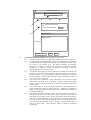
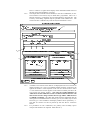
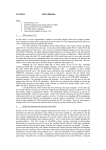
ADAS102 PROCESSING OPTIONS
Data file name : /home/summers/adas/arch102/dhb95fe_001.dat
Browse Index
Nuclear Charge:
26.00
Transition Type:
1
Transition Probability: 5.40E+10
a)
Form:
f
S
Lower Level
1
Stat. Wt. :
Index :
9.0
Stat. Wt. :
Level Energy : 0.347841
c)
Select Energy Form :
INDEX
1
2
3
4
5
6
7
8
A
Upper Level
b)
Index :
18.00
Ion Charge:
4
9.0
Level Energy : 8.705277
cm-1
Rydbergs
Input Temp.
Input Coefft.
Output Temp.
1.000E+00
2.000E+00
5.000E+00
1.000E+01
2.000E+01
5.000E+01
1.000E+02
2.000E+02
1.000E+00
2.000E+00
5.000E+00
1.000E+01
2.000E+01
5.000E+01
1.000E+02
2.000E+02
1.000E+05
2.000E+05
3.000E+05
4.000E+05
7.000E+05
8.000E+05
1.000E+06
2.000E+06
Input Temp. units : Reduced. Input Rate Coefft.: Upsilon . Output Temp. units :
Edit Table
d)
Default Temperature values
Edit the processing options data and press Done to proceed
Cancel
1.4.7.
1.5.
Done
Clicking the Done button causes the next output options window to be
displayed. Remember that Cancel takes you back to the previous window.
The Escape to Menu icon is also available for a quick exit at the bottom left
hand corner.
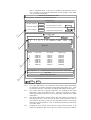
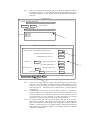
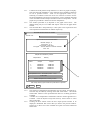
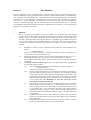
The output options window follows the same pattern as ADAS101. It is more
complex than the generality of ADAS programs and is shown below
1.5.1. There is a choice of method for examination and display of the input data.
At a), click either the ADAS Analysis Option which corresponds to the JET
analysis or the Burgess Analysis Option. The latter is an implementation of
the technique developed by Alan Burgess which is popular in astrophysics.
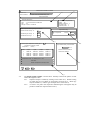
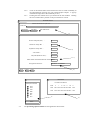
The sub-window at b) varies depending on this choice. Make the appropriate