1
Information You Need To Note
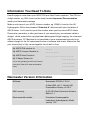
Use this page to note down your ARCS PIN and User Permit numbers. The PIN is a
4-digit number, eg 1234, found on the sheet headed Important Documentation
inside your Navmaster package.
Make a note here of your ARCS Licence number, eg 12345A, found on the UK
Hydrographic Office sheet headed “Schedule A” delivered with your first batch of
ARCS charts. You’ll need to quote this number when you buy more ARCS charts.
Please also remember to take good care of your security key (sometimes called a
dongle), which protects the copyright chart data against illegal copying. As a licensed
ARCS developer, PC Maritime is not permitted to issue replacement security keys
without charge for the full replacement value of software and charts. Make sure that
your security key is fully insured against risk of theft or loss.
My ARCS PIN number is:
____
My ARCS Licence Number is:
________
My ARCS User Permit is:
____ ____ ____ ____
My C-Map eToken # is:
________
(if you are operating a multi-user licence,
________
note the eToken # for each workstation
________
here)
________
________
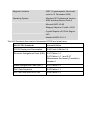
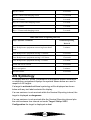
Navmaster Version Information
Software
Navmaster ECDIS v7.0.0.X
C-Map SDK v4.2.1.18 with IHO
Presentation Library v3.4.0.0
ENC security
S-63 IHO Data Protection Scheme
Edition 1.1
Environmental models
Proudman Oceanographic
Laboratory Hydrodynamic Model
version 1.22