1
ffi
Tc.lricd PrnmcteB
of the tunclion @nt b6
Di+lry
m'
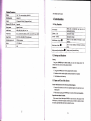
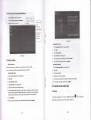
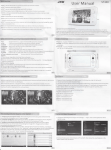
7.E5" IPS srem: resolutim: 1024*768
Opa.litrgsytu
Andrcid 4.2
Ii
Cffi
2.0 mega pixel (ftontlrs.o mega pixel
ii,
Blutulh"
i'
CEvity
GPS,
FM Edio
s@fi
fomt
IDage
I{.264,
fo@t
Exhal @ory
l2GB
at
mdimum
Baftry
3_ry40kAh
m
oGs
Short prcss to sleep/wake up, lotrg press to
sh.tuo dtrd shutdom-
Power bulbn
XVID/DIIX, MPEG 4, SP/H. 263, ASB VP8, eh. (1080
JPG, JPEG, GIF, BMP & PNG (still
card
Function
c-ffior
MP3, MP2, WAV APE, AAC, Eb.
Vido folmt
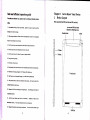
Introduction
1.1 Key
Suppo.ted
Suppofr
i
Andio
1.
(red)
usd.
picm)
Volme + (up)
Volme
- (dom)
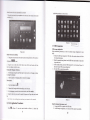
HOMEbuttotr (home)
inwe
the
volme
de6se
the
volwe
Click
I
it in dy
itrterf@ will rehm lo min
intsfre.
Bekbutton (back)
I
ctick it itr my ittqface
display ruently-ued
applicadoJ
display
1.2
vill retM
to preyioN
Emu
remtty browsed hismry
Startup and Shutdown
Startup
I-ng press POWER key for thre rcordr, you
slEteh @ters into screen lek safus, please ulock it.
@
mter startup picture. The
Shutdom
l.
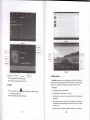
Ioog press POWX\ thqe will be apopup shurdomwiodow.
2.
3.
Shutdomwindowcontai$
Click Shutdom is the
ldt
airpldemode mdshutdomtwooptionv
step.
13 Open and Close ofthe Screen
Scren will be closd otr lts om when no opemtiotr hrppens
1. Sm will
battery
2.
be
clmd
on its
om if
powq
no op@tiotr happens for some time to save
When sc@n is open, press POWER key, lhe s@eo will be closed
Opetr the scrceD whcn lt
imcdiatelv.
ir cl6ed.
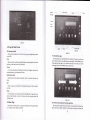
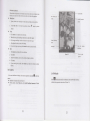
If the sc@n is closed, short prcss POWER to opa the meen. The smm will be
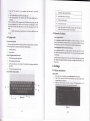
l@ked open it, it will show the picrw 6 below picture, left slide to utrl@k ed aEr
hto me.a" right slide the Drlock icotr to ulock the scrm.