1
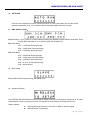
WIRELESS DMX LED PAR LIGHT A:N: Sound Activation closed AUTO RUN Auto Run the combination function of all sub-functions, it can be the master unit, set the Sound Activation parameter to be "N" to close the Sound Activation Mode of the sub-function. DMX Address Setup: Address Range: 1-512, Press UP to setup address upward and DOWN to setup address downward. There are two DMX channels for your choices: DMX 3CH & DMX 5CH DMX 3CH Mode CH1:0-255 Red Dimming Range CH2:0-255 Green Dimming Range CH3:0-255 Blue Dimming Range DMX 5CH Mode: CH1:0-255 Red Dimming Range CH2:0-255 Green Dimming Range CH3:0-255 Blue Dimming Range CH4:R, G, B, W General Dimming CH5:Strobe Speed Slave Mode Choose Slave Mode, Synchronizing with Master unit. Wireless ID Setup Press SETUP, UP OR DOWN at present mode to display current ID, press again to setup new ID, ID value will be added 1 more by pressing one time, ID indicator color will change according one by one. Working Status: LED constant light: Showing current ID, no DMX or wireless signal RED LED flash: Transmitting 第 3 页 共 4 页