1
Common Concerns for Electronically Filing Consolidated Returns
Attaching PDF Files to a Consolidated Return
The IRS allows certain forms to be attached as PDF files to 1120 returns for Corporations that are
required to electronically file. These forms can only be attached at the top (consolidated) level when
electronically filing.
Review the IRS’s list of required PDF files on the IRS Web site to see if you have any of these forms
or schedules in your return. To view a list of forms for 2013 that the IRS allows as PDF or are
required in XML format visit http://www.irs.gov/Businesses/2013SummaryChart .
Attach required forms using the General > Electronic Filing > Section 6, in the PDF Attachment Required section.
All other PDF attachments allowed by the IRS can be attached in the PDF Attachment - Optional
section of the General > Electronic Filing > Section 7, PDF Attachment - Optional section.
File Size Limitations and Other Restrictions for Attached PDFs
Some return types require PDF attachments when electronically filing. For tax years 2015 and
higher, the PDF file is saved with the return. For tax years 2014 and lower, the PDF file is saved on
the machine.
Before attaching PDF files to a return, verify the files adhere to the following guidelines:
The PDF must not be password-protected.
The total size of all PDF files attached to one electronic return submission cannot exceed 1 GB
(1 GB is approximately 5,000 pages).
Multiple PDF files may be submitted, but no one PDF file can exceed 60 MB (approximately
500 pages).
A separate file must be created for each form type included as PDF (for example, one file for
Forms 926, one file for Forms 982).
If any one form type exceeds the 500-page limit, multiple PDF files should be created for the
same form (for example, if a corporation is required to file 600 Forms 926, there should be two
PDF files - each fewer than 500 pages).
For tax years 2014 and lower, the PDF file must be available on the machine that will export
the return for electronic filing.
PDF files with the same name can be attached to different occurrences in the return, provided
each has a unique attachment code.
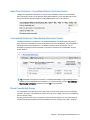
During the electronic filing export process, a list of PDF file names, modified dates, categories
(Required or Optional), and associated forms displays. You can review the content of each PDF
before clicking Export.
Chapter 1 - Exporting Consolidated Returns • 7