1
Wireless Access
INSTALLATION & OPERATING
INSTRUCTIONS
TABLE OF CONTENTS
1.
2.
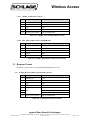
Wireless Access™ System (WAS) ......................................................................................................................5
1.1
Overview .......................................................................................................................................................5
1.2
Panel Interface Module-RS485-Recognition Systems (PIM-485-OTD-RS) .................................................6
Installing the PIM-485-OTD-RS ........................................................................................................................8
2.1
2.1.1
PIM-485-OTD-RS Configuration..........................................................................................................8
2.1.2
WAPM Card Conversion Configuration................................................................................................9
2.2
2.1.2.1
None...................................................................................................................................................9
2.1.2.2
RS_485_HID_26b .............................................................................................................................9
2.1.2.3
RS_485_MAGCARD ........................................................................................................................9
Connecting the PIM-485-OTD-RS to an ACP ..............................................................................................9
2.2.1
PIM-485-OTD-RS using an Original PIM PCB ..................................................................................10
2.2.2
PIM-485-OTD-RS using a RS485 PIM PCB configured for 2 wire communication ..........................10
2.2.3
PIM-485-OTD-RS using a RS485 PIM PCB configured for 4 wire communication ..........................10
2.3
3.
Configuring the PIM-485-OTD-RS...............................................................................................................8
Linking the PIM-485-OTD-RS to WAPMs.................................................................................................10
2.3.1
How to Set an RF Channel ..................................................................................................................10
2.3.2
Linking WAPM’s using the Configuration & Demonstration Tool (CDT) .........................................11
2.4
PIM-485-OTD-RS Alarms ..........................................................................................................................11
2.5
What Happens if the PIM-485-OTD-RS Loses DC Power .........................................................................11
2.6
Using the PIM-485-OTD-RS Reset Switch .................................................................................................12
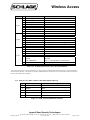
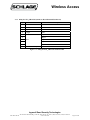
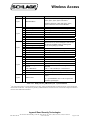
Protocol Commands, Responses, & Datalogs..................................................................................................13
3.1
Communication Packet Format ...................................................................................................................14
3.2
Command Formats.......................................................................................................................................15
3.2.1
Commands for Addressing WAPM’s ..................................................................................................15
3.2.1.1
POLL_WAPM_CRC (same as SendStatusCRC) ............................................................................15
3.2.1.2
POLL_WAPM_CHECKSUM (same as SendStatusChecksum) .....................................................15
3.2.1.3
GET_WAPM_DATALOG (same as SendDatalog) ........................................................................15
3.2.1.4
GET_PREVIOUS_WAPM_DATALOG (same as SendPreviousDatalog) .....................................16
3.2.1.5
WAPM_LOCK_CONTROL (same as OutputControl) ...................................................................16
3.2.1.6
WAPM_TIMED_UNLOCK (similar to DisplayCodedMessage) ...................................................17
3.2.1.7
GET_WAPM_CONFIGURATION (similar to SendUserRecord)..................................................17
Ingersoll Rand Security Technologies
245 W. Roosevelt Road, Bldg 7, Suite 48, West Chicago, IL 60185 / (800) 313-2962 / (630) 293-4257 fax
P/N: M053-027-D
www.ir-swa.com
Page 3 of 38