1
Expanded Toolbars with New Icons
DonorPerfect is better than ever! Many of
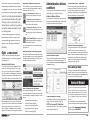
The DonorPerfect toolbar now includes the following
these dramatic improvements are the result
new icons for quick and easy navigation through the
of suggestions from you, our users. We thank system and even onto the web:
you, and welcome further feedback regarding
The Contact Manager icon allows you to
preview or print the Open Item Activity List.
Version 8, or any features and enhancements
you would propose. We believe this update
The Dashboard of Favorite Reports icon
activates your Dashboard, where you can run,
will help you use your system better, and
add, or edit your favorite reports.
demonstrates our commitment to provide the
The DonorPerfect Web Site icon launches
best possible software and support to meet
your Internet browser and goes directly to the
your evolving needs.
clients-only section of the DonorPerfect web
This document highlights the many great
enhancements included in Version 8, with
corresponding page numbers in the new
manual so you can easily find additional
information.
Eight Looks Great!
New icons, toolbars, screen designs and graphical
help tools should make your work quicker, easier and
hopefully more fun!
Administrative Actions
and More!
Version 8 includes many enhancements to simplify the
administration of your DonorPerfect system.
Enhanced Backup Options
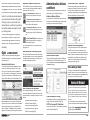
“About DonorPerfect” Expanded
This menu item provides lots of useful details on your
system setup, including the number of user licenses,
when your fiscal year begins, who the system is
registered to, program directory, mailmerges directory,
date of the last backup file, and your client ID.
DonorPerfect’s built in backup tools now make it easy
to maintain up to 9 archived backups with new options
for backing up to various devices. (Page 97)
site.
The User-Defined Web Site icon launches your
Internet browser and goes to a web site you
can configure. (Page 96)
Improved Record Management
For a complete description of all Toolbars and icons,
see pages 35-37.
New Manual and Online Help System
The new DonorPerfect manual and online help system
has been expanded by over 40% and re-organized with
a completely new index and table of contents to help
you take full advantage of Version 8.
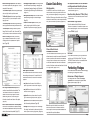
Improved Lookup Screens
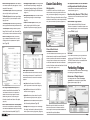
All DP lookup screens have been redesigned in a grid
format. Not only does this make for a nicer look and
feel, but you can now easily control the presentation
(e.g., move a column by just dragging it), sort the entries
by clicking on a column and, if needed, scroll left and
right to allow the display of more fields. (Pages 132-134)
Screen Generator Report
This report provides complete details on the fields and
attributes of each of your DonorPerfect screens. The
report now appears under the Screen Generator menu
in Utilities. (Page 363)
Each constituent record now has a permanent donor
record ID #, which will never be reused (even if you
“Pack” your database). As a result, deleted records can
always be restored. The Restore Deleted Record option
(now available on the Utilities menu) makes it easy to
restore one or a selected group of records and their
entire giving history! (Page 146)
Tell us what you think!
We hope you’re as excited about these improvement
as we are, and we’d love to hear your impressions and
feedback. Visit www.donorperfect.com/suggestions and
tell us what you think about this update!
Version 8 Webinar!
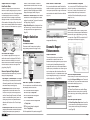
New Conventions on Help Menu
You can now get some quick help on any of the following topics through the Program Aids option on the
Help menu (details on those topics are also in the new
manual):
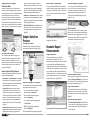
Note: the Done button on this screen was relocated to
the lower-right corner to be consistent, and a new Clear
button speeds clearing an entry or a selection filter to
start a new search. The Done button now consistently
appears in the lower-right corner throughout the system.
Page 2
• Keystroke Conventions (Page 44)
• Mouse Conventions (Page 45)
• Entry Screen Numbering (Page 56)
• DonorPerfect Functions (Page 462)
• FoxPro Functions (Page 455)
Code Maintenance Tracking
We’ve added two fields to your system that tracks who
created a code and on what date. (Page 104)
UTOT for Average Gift Calculation
You can now create a UTOT that calculates the average
of gifts contributed. (Page 195)
Don’t wait to get started using the many new features
in Version 8. This session will have you up to speed in
no time. Learn about new reports, customized to your
personal dashboard, saved with the filter you use most,
then exported to a spreadsheet for further analysis, or to
a PDF for distribution. Space is limited, so enroll today!
Pricing:
$75 per connection/ $25 per additional person.
FREE for clients with unlimited webinar subscription!
Register Online: www.donorperfect.com/training
Register by Phone: 888-220-8111
Page 7