1
Using FlipperPort
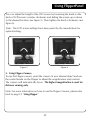
Controlling the Brightness
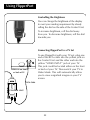
You can change the brightness of the display
to meet your reading requirement by slowly
rolling the dial on the side of the Control Unit.
To increase brightness, roll the dial away
from you. To decrease brightness, roll the dial
towards you.
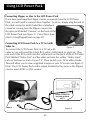
Connecting FlipperPort to a TV Set
VIDEO IN on front
or back of TV
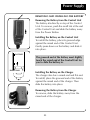
To use FlipperPort with your TV set, plug one
end of the RCA cable into the yellow jack on
the Control Unit and the other end into the
yellow “VIDEO INPUT” jack of your TV.
This jack could be located either on the front
or back of your TV. Then switch your TV to
Video Mode. This will automatically allow
you to view magnified images on your TV
screen.
RCA Cable
CONTROL UNIT
22