1
exported to other software. An export tool saves the contents of the recorded history as a text CSV
file, ready to be opened by spreadsheet applications or dedicated software, to draw wave-forms or
apply personalized analysis algorithms.
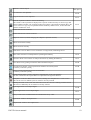
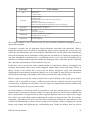
Tool
Description
Undo one execution step.
System state reverts to the previous execution step and the undone step is removed from history.
Execute a single step.
System state is added to the simulation history.
Execute N execution steps. N is defined in the entry bellow.
Every step is stored in the history. Breakpoints are not checked.
Start running continuously. Speed / step rate selectable f the list above: 10ms, 100ms, 500ms, 1, 2, 5 and 10s.
Execution may be interrupted when a breakpoint transition fires. Steps are recorded to history.
Stop continuous run execution.
Reset simulator state and revert to initial state.
Previous history is not erased.
Force a new system state: the new marking must be previously manually changed in the state form.
Execution history is erased and reset with the new state.
History navigation: Rewind to first recorded step.
History navigation: Move back one step.
History navigation: Move forward one step.
History navigation: Forward to last recorded step.
Reset history: clear all recorded steps.
Replay history starting from current position.
Replay speed defined in the list above.
Pause / stop replay
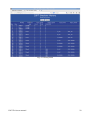
Open history window, presenting the recorded history as a spreadsheet.
Drag / Pan mode – Useful to scroll the drawing area on touchscreen devices
Save/export history to a CSV text file.
This file can later be opened using a spreadsheet application to draw wave-forms, etc.
Exit the simulator.
IOPT Tools user manual
21