1
Table of Contents
Miscellaneous
- Introduction ................................................................................................... 2
- Keywords Glossary / Info Texts .....................................................................2
Data Interface ............................................................................................... 2
Safety Notes
- Using the Device in Compliance with the Recommendations ..................... 3
- Personal ....................................................................................................... 3
- Emergency step off ...................................................................................... 3
- Patient Safety ............................................................................................... 4
- Patient Treatment ......................................................................................... 4
- Notes From the Manufacturer to the User .................................................... 4
- Accessories .................................................................................................. 4
- Software ....................................................................................................... 4
- Documentation ............................................................................................. 4
- Installation / Update ...................................................................................... 4
- Potential Equalisation ................................................................................... 4
- Other Notes .................................................................................................. 5
- Unauthorised use ......................................................................................... 5
- Connecting the device .................................................................................. 5
Setting Up
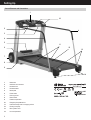
- Control Elements and Connections .............................................................. 6
- Switching On / Off ........................................................................................ 7
- Wireless Pulse Rate Measure ...................................................................... 7
- EMERGENCY STOP switch ......................................................................... 7
- EMERGENCY STOP safety rope ................................................................. 7
The Dashboard
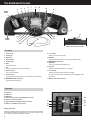
- Top panel - Overview of the control elements .............................................. 8
- Underside - Overview of the connectors ...................................................... 8
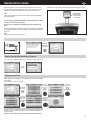
Dashboard User Guide
- Switching On ................................................................................................ 9
- Starting Training Without Selecting a Program ............................................ 9
- Setting Personal Data .................................................................................. 9
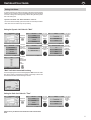
- Starting Training by Selecting a Program ..................................................... 10
- Training Programs ........................................................................................ 10
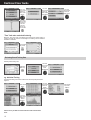
- Setting Limit Values .............................................................................. 11 - 12
- Reviewing Stored Training Data ................................................................... 12
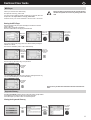
- MP3 Player ................................................................................................... 13
- Keywords Glossary ............................................................................................................. 13
General Notes
- Important Notes ................................................................................................................... 14
- Training Hints ....................................................................................................................... 14
- Environmental Conditions .................................................................................................. 14
- Used Symbols ..................................................................................................................... 14
- Compliance to Standards ................................................................................................... 14
Application Domains ....................................................................................................... 14
Maintenance .......................................................................................................................... 14
EC - declaration of conformity .............................................................................................. 15
Specifications ......................................................................................................................... 16
Assembly and Installation Guide
- Package content ................................................................................................................. 17
- Tools and Small Parts ......................................................................................................... 17
- Transport and packaging ................................................................................................... 18
- Installing the device ............................................................................................................. 18
- Installation steps 1 - 5............................................................................................... 18 - 20
Service
- Testing according to the prescriptions of the by-law for operating medical products ... 21
- Liability .................................................................................................................................. 21
- Simple Maintenance and Service Activities .................................................................... 21
- Adjusting the running belt ................................................................................................... 22
- Applying Silicone Oil Lubricant ......................................................................................... 22
- Replacement of the Dashboard Battery ........................................................................... 22
Testing / Placing into service ........................................................................................ 23 - 24
Service Operation ................................................................................................................. 25
GNU General Public License ..................................................... 26 - 27
Miscellaneous
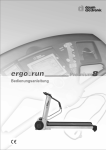
The ergometer ergo_run medical8 is a medical treadmill ergometer designed
to diagnostic the performance capacity of a test person and to train the test
person under medical supervision. It is very well suited for diagnostic and
therapeutic utilisation and for ergometry testing.
All ergo_run medical8 treadmill ergometers are equipped with standard interface
protocols and can thus be used in conjunction with ECG printers or personal
computers of various manufacturers.
Please note that only properly educated and qualified staff (personnel) may
proceed with the installation and utilisation of the ergo_run medical8.
Please read this operating instructions carefully!
Keywords Glossary / Info Texts
Please refer to the information concerning each operation status stored in the
dashboard. Use the Info-key to display this information.
The keywords glossary provides additional information and explanations.
The keywords glossary and the info-texts are an essential part of this
operating instructions.
2
Data Interface
You can use an ECG device or a personal computer (PC) to control the ergo_run
medical8. A special data cable is needed to this effect, which you can order from
daum electronics gmbh.
The data transmission protocols of the controlling device (apparatus) and of the
ergo_run medical8 must be configured to recognise each other. Please contact
daum electronic gmbh, or a company authorised by it, if needed.
Warning:
- Optional equipements, that are connected to the digital interfaces of the ergo_run
medical8, must provably comply with the EN specifications (e.g. EN 60950 for
data processing devices and EN 60601 for electromedical devices). Furthermore,
all the configurations must comply with the system standard of the GEF (German
Electrotechnology Federation) 0750 part 1-1. Whoever connects optional
devices to the signal input or output line, configures a system and is consequently
responsible of maintaining the compliance to the GEF 0750 part 1-1 system
standard. Please if you have any questions contact the provider of the device
in question.
- You must never touch device parts that are conducting very low safety voltage
and patients simultaneously.