1
Software manual RISE 2.0
Contents
1
2
3
4
5
6
7
8
Start the application and login ........................................................................................ 3
1.1
Two ways to access the RISE 2.0 application ......................................................... 3
1.2
Language selection ................................................................................................. 3
1.3
Login to your personal user account ........................................................................ 4
Selection of a farm and opening a questionnaire ............................................................ 5
2.1
Selection of a farm .................................................................................................. 5
2.2
Check out and open a questionnaire ....................................................................... 5
The RISE survey ............................................................................................................ 7
3.1
Basic functions ........................................................................................................ 7
3.2
The questionnaire tree ............................................................................................ 7
3.3
Saving data ............................................................................................................. 8
3.4
Different types of questions ..................................................................................... 9
Administrate questionnaires and farms..........................................................................11
4.1
Adding, deleting and copying farms and surveys ....................................................11
4.2
Printing a survey ....................................................................................................12
Calculation and analysis ................................................................................................13
5.1
Calculate a questionnaire .......................................................................................13
5.2
The analysis section ...............................................................................................15
5.3
Calculate average values .......................................................................................17
5.4
Compare farm results .............................................................................................19
5.5
Export results to create a report .............................................................................20
Working in offline mode .................................................................................................22
6.1
Start the RISE application ......................................................................................22
6.2
Synchronization of data before switching to offline mode .......................................22
6.3
Using the software in offline mode..........................................................................24
6.4
Synchronize data after having worked offline .........................................................25
Administration ...............................................................................................................27
7.1
Open the administration part ..................................................................................27
7.2
Extend a region with animals and crops .................................................................28
7.3
Extend master data ................................................................................................29
7.4
Add additional questions to a project ......................................................................30
Frequently asked questions FAQ ..................................................................................31
Annex I: Create your own RISE user account .......................................................................33
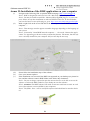
Annex II: Installation of the RISE application on your computer ............................................34
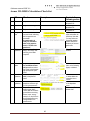
Annex III: RISE-Calculation Check-list..................................................................................35
2