1
Printer Operation
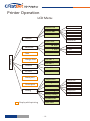
LCD Display
1
2
3
4
5
6
7
8
9
1. Current temp. 1
9. Fan speed
2. Target temp. 1
10. Cur. Z position
3. Current temp. 2
11. Remaining time
4. Target temp. 2
12. SD card icon
5. Current temp. 3
13. printing speed
6. Target temp. 3
7. Cur. hotbed temp.
8. Tar. hotbed temp.
13
12
11
10
Keypad
KEY
Z-
FUNCTION
Up
OK
Z+
Down
OK
KEY
FUNCTION
-
Move Z up
+
Move Z down
Z
Z
OK
Browse SD card
Status/Home
Pause/Resume
Preheat nozzle/bed, and switch between them
Notice: Up/Down can change global print speed.
Knob
1. Push knob to confirm, rotate to move up down.
2. Ratate knob can change global print speed.
PUSH
- 9-