1
Getting Started
SIM Card Activation
Inserting your SIM
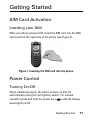
With your phone powered off, insert the SIM card into the SIM
card socket at the right side of the phone (see Figure 2).
Figure 1. Inserting the SIM card into the phone.
Power Control
Turning On/Off
When installed properly, the phone powers on and off
automatically using the car's ignition switch. For manual
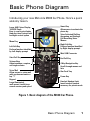
operation press and hold the power key ( ) until the display
panel lights on/off.
Getting Started
17