1
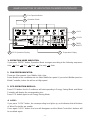
NAME & FUNCTION OF BUTTONS ON WIRED CONTROLLER
MODE
1
TIME ON
2
TIME OFF
3
CLOCK
4
OK
5
RESET
6
TIME
ON
CLOCK
TIME
OFF
OK
7
ON/OFF
8
FAN SPEED
9
TEMP
10
TEMP
ECO
FAN SPEED
MODE
RESET
LOCK
SWING
TEMP
11
SWING
12
ECO
13
COOL ONLY/
COOL & HEATING
14
LOCK
COOL/HEAT
1. MODE BUTTON:
If you press this button, Operation Mode changes according to the following sequence:
AUTO
COOL
DRY
HEAT
FAN
2. TIME ON BUTTON:
Press this button once: TIMER ON function (Programmed Start) will be enabled.
The Wired Controller’s TIMER is not a clock, so it is necessary to set the time period not the exact time - at the end of which you would like the Air Conditioner to start automatically.
At each press of the button, setting time interval will increase by half an hour till 10 hours, and
by an hour from 10 to 24 hours.
To cancel TIMER ON function, set time to “0.0”.
3. TIME OFF BUTTON:
Press this button once: TIMER OFF function (Programmed Stop) will be enabled.
The Wired Controller’s TIMER is not a clock, so it is necessary to set the time period not the exact time - at the end of which you would like the Air Conditioner to stop automatically.
At each press of the button, setting time interval will increase by half an hour till 10 hours, and
by an hour from 10 to 24 hours.
To cancel TIMER ON function, set time to “0.0”.
-6-