1
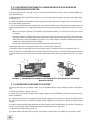
C
B
E
A
D
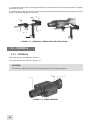
Figure 3-6. MOUNTING THE Spark TO A SCOPE
3.1.7 MOUNTING THE Spark TO A DUAL BRIDGE
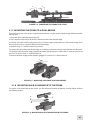
To install two Spark units onto a single binocular device, use the optional dual bridge. Perform the following steps:
1. Align the Spark with the dual bridge (A).
2. Press down on the clamps (B) that are located on the front of the bridge.
3. Pull the unit back until the alignment boss is lined up against the groove (C) of the dual bridge. Push
the unit back until it is securely fixed to the dual bridge.
4. Perform steps 1-3 with the second Spark unit.
To remove the Spark from the dual bridge, press down on the front clamps and slide the unit forward.
To configure the Spark for long-range observation with binoculars, mount the 3x accessory lenses to
the units as seen in Part 3.1.10 of this Manual.
To mount the dual bridge to the optional goggle kit, see Part 3.1.2 of this Manual.
A
B
C
Figure 3-7. MOUNTING THE Spark TO A DUAL BRIDGE
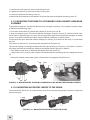
3.1.8 MOUNTING AN IR ILLUMINATOR TO THE Spark
To mount an IR illuminator to the Spark, use the optional Dovetail to Weaver Transfer Piece. Perform
the following steps:
C
B
A
Figure 3-8. MOUNTING AN IR ILLUMINATOR TO THE Spark
21