1
Module Application
Successful application of this module assumes working knowledge of DMX control systems in
general. It also assumes that you are familiar with the CueServer series of web controls. As the
CueServer series can support multiple types of equipment setups, it is important that you
understand the configuration of these setups and the terminology of the equipment involved.
Note about Polling for current level feedback
This module supports the usage of polling for current feedback of all 512 channels of the
CueServer. However, it is not recommended to continuously poll for updated information as this
is a very intensive request on the Crestron processor for a brief period of time. Furthermore,
while this module polls for information, UDP commands from the CueServer Channel Level Set v1
will not be generated. Please see the demo program for the correct way to program this.
Button Feedback
Included in the module distribution is a module for CueServer buttons. This module is used to
trigger buttons programmed in the CueServer and for button feedback. The feedback state of
CueServer buttons is dependent on how the “Indicator” section has been programmed via the
web control.
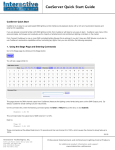
See the example to the left. In this
example, we have set button 1 up as
toggle. In this configuration when the
button is pressed, it will toggle Channel 10
between 100% and 0%. The Indicator
feedback at the bottom of the page is set
to “Channel At 100%”. When the channel is
at 100% the button will feedback will be
high.
There are many other ways to program
buttons, and if you have any questions
regarding button programming please
contact Interactive Technologies.
CueServer Control Modules v1
Telephone: (+1)440-449-1100
ControlWorks Consulting, LLC
support@controlworks.com
http://www.controlworks.com