1
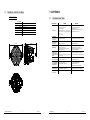
3.3
EDIT STATIC COLOUR
MENU
STAT
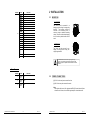
3.6
DMX512 SETTINGS
Red
Green
Blue
(0~255)
(0~255)
(0~255)
MENU
Strob
(0~20)
【DMX】
D(001~512)
● Enter the【DMX】mode to set the DMX ADDRESS.
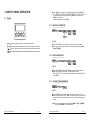
【STATIC COLOUR】
● Combine 【Red】, 【Green】&【Blue】 to create an infinite
range of colors (0-255)
● Set the value of the 【Strobe】 (0-20Hz)
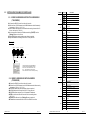
3.7
PERSONALITY
MENU
3.4
DMX
PERS
TOUR
Arc.1
Ar1.d
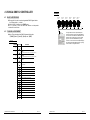
ACTIVATING AUTO PROGRAMS
MENU
AUTO
Ar1.s
HSV
AT.01
AT.02
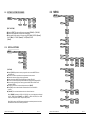
【PERSONALITY】
● Enter the【PERSONALITY】mode to select DMX mode:【TOUR】,【Arc.1】,
【Ar1.d】,【Ar1.s】or【HSV】 .
AT.10
PR.01
PR.02
PR.10
【AUTO】
3.8
● Select the target【AUTO】 program and press【ENTER】.
● Programs【AT.01】to【AT.10】are fully pre-programmed and will not be
altered by changes in【EDIT 】mode.
● Programs 【PR.01】to【PR.10】are fully pre-programmed and can be edited
in 【EDIT 】mode.
3.5
ID ADDRESS
MENU
ID
ID(01~66)
【ID】
● Enter the【ID】mode to set the ID ADDRESS.
RUN MODE
MENU
RUN
DMX
SLAV
【RUN 】
● Enter the【RUN 】mode to set working mode.
● 【DMX】 mode is for using the DMX512 controller to control the fixtures.
● 【SLAV】 mode is for Master -- Slave operation.
3 DISPLAY PANEL OPERATION
10
2011.6.2
3 DISPLAY PANEL OPERATION
11
2011.6.2