1
S4 Tech Inc
Table of Contents
Mobile DOG System Description............................................................................................................. 3
Setting up the Mobile Base Station .......................................................................................................... 4
Opening the Unit................................................................................................................................... 5
Connecting Power ................................................................................................................................. 6
AC Power.......................................................................................................................................... 6
DC Power.......................................................................................................................................... 7
Powering Up the Mobile DOG ............................................................................................................. 8
Setting up the Rugged Remote Cameras (up to 1500 ft) ........................................................................ 10
Connecting the Cameras to the Mobile DOG Base Station ................................................................ 11
Using the External PTZ Joystick ........................................................................................................ 13
Alignment of Cameras ........................................................................................................................ 14
Removing a connection from a Remote Camera Unit (Figure 17) ..................................................... 15
DVR Setup .............................................................................................................................................. 15
Power Down ....................................................................................................................................... 17
Password Setting................................................................................................................................. 17
Set the Date/Time ............................................................................................................................... 17
Set Recording Mode ........................................................................................................................... 18
Configure Motion Detection, Video Loss, and Alarms ...................................................................... 18
Exporting Video Clips to CD ............................................................................................................. 19
Changing/Focusing a Lens ..................................................................................................................... 20
Maintenance............................................................................................................................................ 21
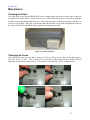
Cleaning the Filters ............................................................................................................................. 21
Changing the Fuses ............................................................................................................................. 21
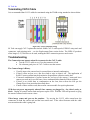
Terminating CAT-5 Cable ...................................................................................................................... 22
Troubleshooting ...................................................................................................................................... 22
Contact Info ............................................................................................................................................ 24
Replacement Parts .................................................................................................................................. 24
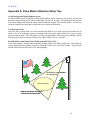
Appendix A: Video Motion Detection Setup Tips ................................................................................. 25
Table of Figures
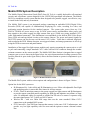
Figure 1: Mobile DOG Base Station ........................................................................................................ 3
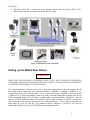
Figure 2: Mobile DOG System and Options ............................................................................................ 4
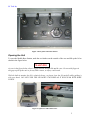
Figure 3: Rear panel of the Base Station. ................................................................................................. 5
Figure 4 Open Case and Caution Area. ................................................................................................... 5
Figure 5: The Front or User Panel. ........................................................................................................... 6
Figure 6: Connecting AC Power............................................................................................................... 7
Figure 7: Connecting DC Power............................................................................................................... 7
Figure 8: Power on the Unit...................................................................................................................... 8
Figure 9: Turn off the Battery Alarm. ...................................................................................................... 8
Figure 10: Powered Up Monitor View. .................................................................................................... 9
Figure 11: Prep CAT-5 for Camera Connection..................................................................................... 10
Figure 12: CAT-5 Cable through Watertight Connector Body .............................................................. 10
Figure 13: Complete CAT-5 Camera Connection .................................................................................. 11
Figure 14: Connect Camera to Base Station. .......................................................................................... 12
Figure 15: Live Camera Image on Monitor. ........................................................................................... 12
Figure 16: External PTZ Joystick. .......................................................................................................... 13
1