1
6.3
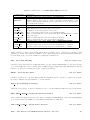
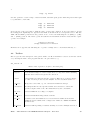
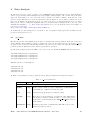
tstart
real
tstop
real
group
string
bary
boolean
ra
real
dec
real
auxtype
integer
tcor
integer
clobber
boolean
chatter
integer
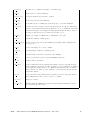
Overall start time for GTI calculations. Relevant if a bad time
interval is defined (then the time from tstart to begin is good
time) or if begin is set relative. If left as a negative number,
the value will be either read from the data structure addressed in
group or set to a predefined fixed value
default: -1.0
Overall end time for GTI calculations. Otherwise as tstart.
< 0 =use default
default: -1.0
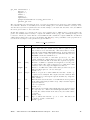
DOL of a baseline group from which some values, especially
tstart and tstop can be taken. In case of “inverse barycentered” GTIs (see parameter bary), this must be given and contain ISDC auxiliary data, especially orbital information matching
the selected times.
If set to yes, the user given GTI times are taken to be valid at the
Solar System Barycenter. From these, the corresponding times
of observation – needed for the GTIs – are then approximately
derived. The accuracy of the inversion is 1ms.
default: no
The Right Ascenscion of the source for which the barycentric
corrections are calculated. Must be set to a reasonable value if
bary=y.
-99=INDEF
default: -99.0
The Declination of the source for which the barycentric corrections
are calculated. Must be set to a reasonable value if bary=y.
-99=INDEF
default: -99.0
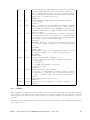
Selection flag which kind of auxiliary to use:
0 = any, i.e. use historic if possible, or snapshot or predicted
1 = use snapshot
2 = use predicted
3 = use NRT data (snapshot or predicted)
4 = use historic data
default: 0
Required accuracy in time correlation:
0 = accurate, i.e. return NaN if no accurate correlation possible
1 = inaccurate, i.e. extrapolate time correlation forward if needed
3 = any, i.e. extrapolate time correlation forward & backward
default: 3
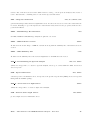
Shall existing output be deleted or not?
default: no
Verbosity level of the outputs (0 to 5 with 2 as “normal”)
default: 2
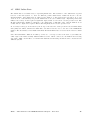
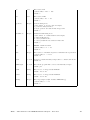
cat2ds9
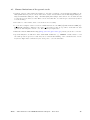
After analyzing your data with the ISDC scripts you have as a result an image file and a file with the names
of the found sources. The cat2ds9 program allows you to create a region file from your catalog, so that with
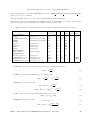
DS9 you can see the position of the sources on the produced image. In Table 10 the parameters of cat2ds9
are given.
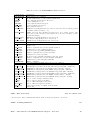
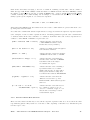
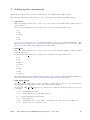
The following two commands extract region files of the sources found in the course of IBIS data analysis and
of the catalog sources.
ISDC – Introduction to the INTEGRAL Data Analysis – Issue 10.1
42