1
T Wed g e User Do cu men t ati o n
6.5
Hotkey
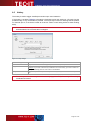
The hotkey is used to trigger JavaScript execution upon user interaction.
If the hotkey is enabled, TWedge executes the OnHotkey script (see section 6.4.5) each time the
predefined key or key combination is pressed. The script may be used for starting data acquisition
on demand (this is, if the device needs to receive a certain control string before it starts sending
data).
► Please note: The hotkey will be activated as soon as the communication is started, and it will
be deactivated if the communication is stopped.
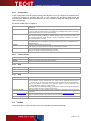
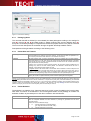
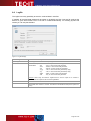
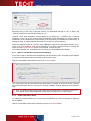
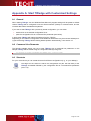
Figure 9: Hotkey Settings
Enable Hotkey
Enables/disables the hotkey.
Modifiers
Key modifiers for the selected key. (Multiple selections are possible).
Key
Key selection.
Example: If you want to use the key combination Ctrl+F9 as hotkey, you have to select "F9"
as key. Additionally press the "Ctrl" button in the Modifiers.
Script Editor…
This button opens the script editor so you can directly modify the code in the OnHotkey section.
► Certain key combinations may not work as hotkey (e.g. Win+TAB). Please try different key
combinations instead!
Page 21 of 42