1
1. The horizontal bar comes in two sizes: 30cm for the SB-30 and 66cm for the SB-66. The 30cm
and 66cm horizontal barS are interchangeable in the field. The maximum microphone holder
spacing is as follows:
Model
Minimum spacing
Maximum spacing
SB-30
7cm (2.75”)
26cm (10.2”)
SB-66
7cm (2.75”)
61cm (24”)
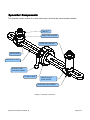
2. The stand clamp mounts on a standard 5/8”-27 microphone stand thread. Note: the threaded
section of the microphone stand should not be longer than 7/16”. Threading the stand further
than 7/16” into the stand clamp can cause the horizontal bar to bind and not rotate freely.
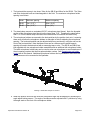
3. The microphone holders are secured to the horizontal bar by the position lock nuts. Loosening
these nuts will allow the microphone holders to slide side to side for adjusting the microphone
spacing. The horizontal position can be adjusted with 5mm precision by using the ruler on the
front of the horizontal bar. Note that these rulers are for reference as the actual capsule
spacing will need to be determined with a measuring tape or ruler. The SB-30 and SB-66 are
both supplied with two microphone holder assemblies and an additional tall microphone holder.
The taller microphone holder body can be used to raise one microphone to avoid interference if
the mic spacing requires that the microphone bodies overlap. See Changing the mic holder
height later in this manual. Additional microphone holders can be purchased if more than two
microphones are to be mounted to the Spacebar.
Drawing 2: SB-66 with multiple mic holders
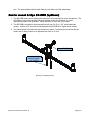
4. When the position lock nuts are loose the microphone angle can be adjusted by loosening the
angle adjust locking screws. The angle of incidence can be adjusted with 5° precision by using
the angle scale on the front of the microphone holder.
Spacebar User Manual Revision B
Page 3of 9