1
on the DSL modem. Once the tunnel has been established, this kind of DSL modem will
forward the PPP session to the ISP. As long as the PPP session is connected, all the local
users will be able to share this PPP session to access to the Internet.
Static or Dynamic IP: On this page you configure the WAN interface to use a static
(fixed) IP or dynamic (DHCP client) IP address. Most cable users will use the dynamic IP
address mode to get a globally reachable IP address from the cable head-end system.
For ISDN Internet users, you should click Diaing to a Single ISP or Dialing to Dual ISPs
for detailed Internet settings.
For broadband access users, you need to know what kind of Internet access is provided
by your ISP.
The following sections deal with four widely-used broadband access services. These are
PPPoE Client, PPTP Client and Static IP for DSL, and Dynamic IP (DHCP Client) for
Cable. In most cases, you will get a DSL or Cable modem from the broadband access
service provider. The router is connected behind the broadband device (i.e. DSL/Cable
modem) and works as a NAT or IP router for broadband connections.
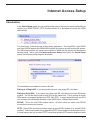
Configuration
- Connecting to a Single ISP
ISP Access Setup
ISP Name: Enter your ISP name.
Dial Number: Enter the ISDN access number provided by your ISP.
Username: Enter the username provided by your ISP.
Password: Enter the password provided by your ISP.
Require ISP Callback (CBCP): If your ISP supports the callback function, check
Require ISP Callback (CBCP) to enable the Callback Control Protocol during PPP
2