1
2 Introduction
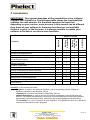
IMPORTANT: This manual describes all the possibilities of our software
DigiSave and OptimDrive. The following table shows the functionalities
available for each version. It is therefore important to know that,
depending on your version, some screens in this manual can be different
than those of your software or that some functions are not available
(buttons in grey). In the last case, it is always possible to update your
software to be able to use those extra functions.
Export of file in official format
Exchange of data between different programs DigiSave
(function import/export)
checking of the signature of the file and checking of
missing downloads
Function « read card »
OptimDrive
Storage of tachographs data
DigiSave_
OptimDrive_
Server
Storage of drivers cards data
DigiSave_
OptimDrive
Functions
DigiSave+
Software version
√
√
√
√
√
√
√
√
√
√
√
√
√
√
√
√
√
√
√
√
√
√
√
√
√
√
√
√
√
√
√
√
√
Analyze of drivers card data
Printing of the analyzed drivers card data
Calculation of infringements
Printing of infringements
Management of remaining periods
Printing of remaining periods
Server version
√
√
√
√
√
Definition: In this manual the name:
- “DigiSave” is used for the software “DigiSave” and al his existing versions: DigiSave+,
DigiSave_OptimDrive and DigiSave_Server.
- “OptimDrive” is used for the software “OptimDrive” (Driver).
- “Module OptimDrive” is used for the set of functions: optimization of the driving and rest
periods. This means the calculation and printing of the infringements and also the managing
and printing of the remaining periods, and this for the software DigiSave and OptimDrive.
- “The Software” is used in general for both DigiSave and OptimDrive when the described
functions are the same for the 2 programs.
PHELECT SPRL
Rue des Trois Entités, 15 – Z.I. des Plénesses
4890 THIMISTER/CLERMONT
℡ +32 87/56 02 74 - +32 87/55 26 39 - ) 0439.839.075
www.phelect.be - administration@phelect.be
V3.0
3