1
CHAPTER 1 / INSTALLATION
PXPLUS INTERPRETER
If you do not already have PxPlus version 11 or higher installed on your computer, download it from the following site:
http://www.pvxplus.com/pgsrvr.pvp?pg=downloads
PvxPlus Technologies sells a complete “Developer Version” of PxPlus for a subscription price of only $100/year per
programmer. Contact their sales department at this link for more information.
ULTRAEDIT
Download UltraEdit version 19 (or higher) from this site:
http://www.ultraedit.com/downloads/ultraedit_download.html
The good folks at IDM Corporation have shown their support for our community by providing a 20% discount on UltraEdit
and all other IDM products for users of stzUE. When ordering from the IDM website, use coupon code stzUE8541257932.
Note that this discount coupon is limited to 100 uses and expires on 12/31/2014 - act fast so you don't miss out!
INSTALL STZ UE
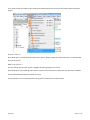
stzUE.zip contains all files and programs necessary to configure UltraEdit and run the stzUE tools. Folders must be created
exactly as defined in the zip file, with everything simply unzipped to the C:\ root folder. After unzipping the file, you should
have a c:\steezware main folder with subfolders as shown below:
The C: drive must be used for installing stzUE, since the UE tool definitions have dependencies based on the
“c:\steezware\” folder structure. You cannot use D: or any other drive letter or mapping.
stzUE.docx
Page 3 of 18