1
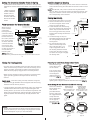
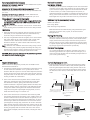
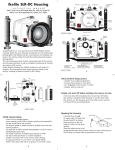
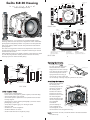
Type 1 Installation: Figure B
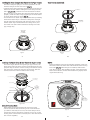
Installing the Zoom Clamp & Gear Sleeve On the Type 1Lenses
The Zoom Clamp has springs so it can be expanded to fit over
the Zoom Ring of the lens as shown in (Fig. C).
Install the Zoom Clamp with the extension tabs toward the rear
element of the lens. After installing the Zoom Clamp and Gear
Type 1 Installation:
(Fig. DFigure
& EA), install the Lens Port and rotate the Zoom
Sleeve
Ring on the lens. If the Zoom Ring and Gear Sleeve do not mesh
properly, install the rubber strips (supplied) to the inside diameter of the Zoom Clamp as shown (Fig. F).
Two thicknesses of rubber strips are provided. Start by installing
the thinnest rubber strips. If the Zoom Clamp still is not tight
enough and meshes improperly with the Gear Sleeve, use the
thicker rubber strips. Reinstall the Zoom Clamp, Sleeve, and
Port. Mesh Gear Sleeve teeth with Black Housing Drive Gear
(Fig. G-Page #12)
Type 1 Lenses (continued)
Gear Sleeve
ribs
Align with
Zoom Clamp
grooved tabs
Type 1 Installation: Figure C
Type 1 lens
mounted
to camera
Figure D
Figure B
zoom
ring
apply
rubber strips
to inside of
clamp
Figure C
9
Figure F
Figure E
Figure A
Figure C
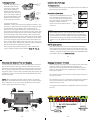
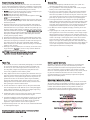
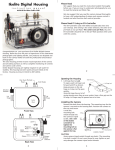
Installing the Zoom Clamp & Gear Sleeve On Type 2 Lenses
Due to the larger diameter lens opening on Type 2 lenses, the
Zoom Clamp and Gear Sleeve need to be installed from the rear
(bayonet end) of the lens. Use the housing Lens Release Control
and remove the camera lens from the camera body, after the
camera and lens have been installed in the housing.
Type 2 Installation: Figure 1
10
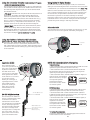
NOTE:
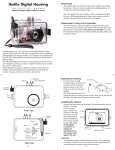
Before installing the lens port and checking operation, make sure
the teeth on the Gear Sleeve mesh with the teeth on the housing
Drive Gear (Fig. G). When the port is installed, it will lock the
Gear Sleeve in place. After installing the port, rotate the housing
Zoom Control Knob to see that the Gear Sleeve is properly rotating the lens Zoom ring.
Lens Zoom Ring
Lens Manual
Focus Ring
IKELITE
Zoom Clamp
Align
Zoom Clamp
grooved
tabs with
Gear Sleeve
ribs
Gear Sleeve
TOP OF HOUSING
Mesh
Gear Sleeve
teeth with
Black Housing
Drive Gear
Manual Focusing Note:
Type 2 lens
Ikelite DSLR housings are designed for auto-focus DSLR
cameras and lenses. Manual focusing is not recommended. If
you desire to manually focus a lens, the zoom clamp must be
moved onto the lens Manual Focus Ring and you must use the
housing zoom control knob to manually focus. This will result in
loss of zoom capability.
11
Figure G
12