1
VMware Server User’s Guide
Linux Hosts
Use the NAT configuration file on the host to configure the NAT device. This file is /etc/vmware/vmnet8/nat/nat.conf.
The configuration file is divided into sections. Each section configures a part of the NAT device. Text surrounded by square brackets — such as [host] — marks the beginning of a section. In each section is a configuration parameter that can be set. The configuration parameters take the form ip = 192.168.27.1/24.
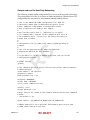
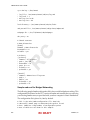
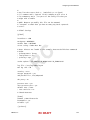
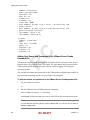
For an example of a NAT configuration file, see “Sample Linux vmnetnat.conf File” on page 248. The configuration file variables are described below.
The [host] Section
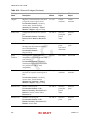
ip The IP address that the NAT device should use. It can optionally be followed by a slash and the number of bits in the subnet.
netmask
The subnet mask to use for the NAT. DHCP addresses are allocated from this range of addresses.
configport
A port that can be used to access status information about the NAT.
device
The VMnet device to use. Linux devices are of the format /dev/vmnet<x>. VMnet8 is the default NAT device.
activeFTP
A flag that indicates if active FTP is to be allowed. Active FTP allows incoming connections to be opened by the remote FTP server. Turning this off means that only passive mode FTP works. Set the flag to 0 to turn active FTP off.
The [udp] Section
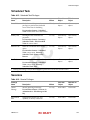
timeout
The number of minutes to keep the UDP mapping for the NAT.
The [incomingtcp] Section
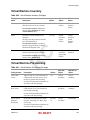
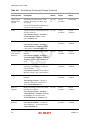
Use this section to configure TCP port forwarding for NAT. You can assign a port number to an IP address and port number on a virtual machine. The following line shows the format used in this section.
8887 = 192.168.27.128:21
244
RC DRAFT
VMware, Inc.